阿里云通义千问 (Qwen) API Key 申请与配置指南 阿裏雲通義千問 (Qwen) API Key 申請與配置指南 Alibaba Qwen Official API Key Setup Guide

1

访问开放平台与注册登录 訪問開放平台與註冊登錄 Step 1: Access Console & Sign In

访问阿里云百炼大模型服务平台:

https://bailian.console.aliyun.com/ 🚀 一键直达

登录阿里云账号并开通百炼模型服务。

訪問阿裏雲百煉大模型服務平台:

https://bailian.console.aliyun.com/ 🚀 一鍵直達

登錄阿裏雲賬號並開通百煉模型服務。

Log in to Alibaba Cloud Bailian console:

https://bailian.console.aliyun.com/ 🚀 Direct Access
2

创建 API Key 密钥与获取 Endpoint 創建 API Key 秘鑰與獲取 Endpoint Step 2: Generate API Key & Get Endpoint

进入百炼控制台【API-KEY 管理】页面,点击【创建 API Key】并保存秘钥。

如下图所示,您可以在 API Key 列表上方直接查看百炼官方提供的 OpenAI 兼容 API 地址 (API Base URL)

① 通用 API 地址:https://dashscope.aliyuncs.com/compatible-mode/v1
② 独立空间 Endpoint:https://{WorkspaceId}.cn-beijing.maas.aliyuncs.com/compatible-mode/v1
⚠️ 注意:密钥仅完整显示一次,请妥善保存在安全的本地存储中。
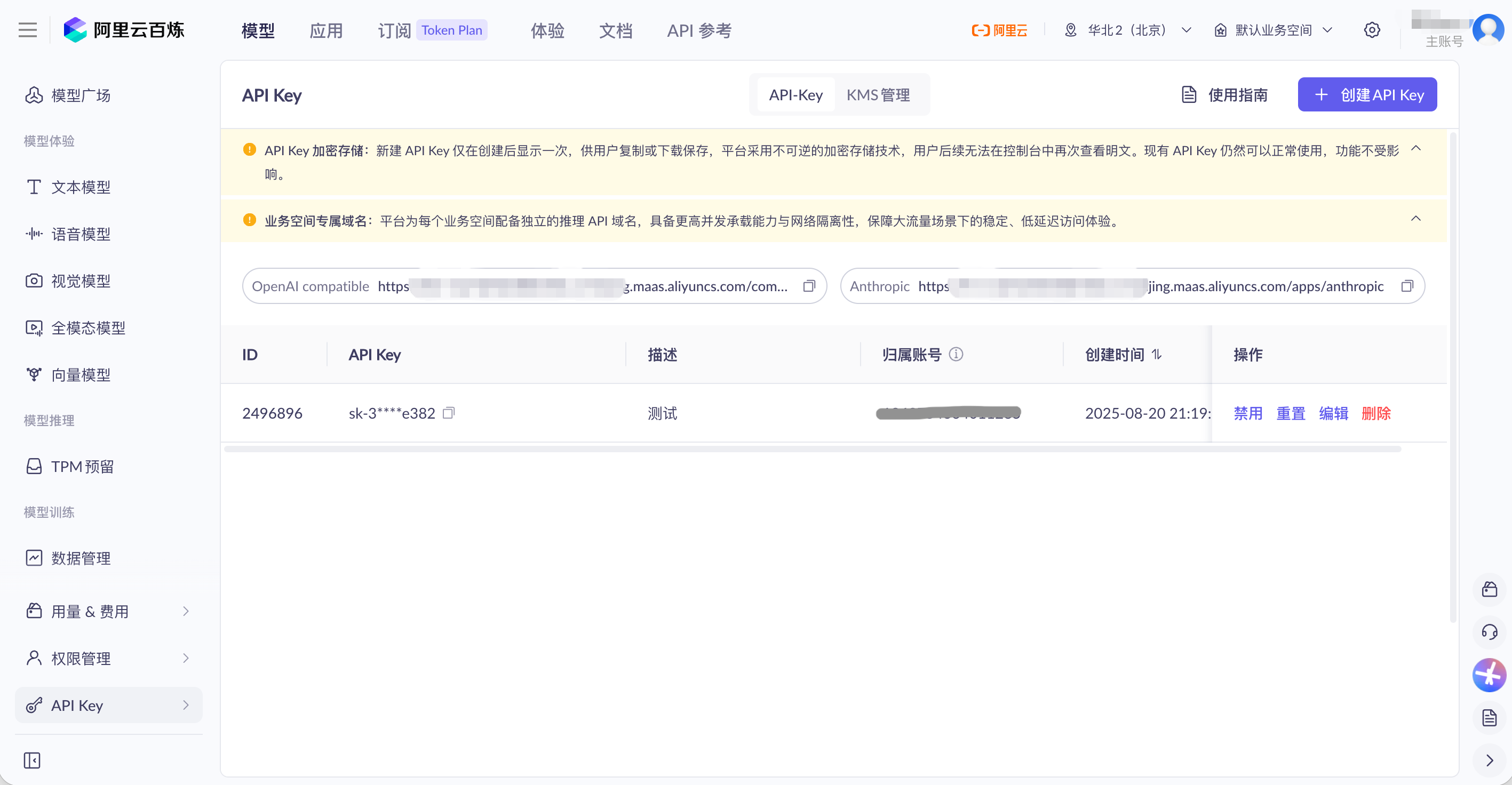
進入百煉控制台【API-KEY 管理】頁面,點擊【創建 API Key】並保存秘鑰。

如下圖所示,您可以在 API Key 列表上方直接查看百煉官方提供的 OpenAI 兼容 API 地址 (API Base URL)

① 通用 API 地址:https://dashscope.aliyuncs.com/compatible-mode/v1
② 獨立空間 Endpoint:https://{WorkspaceId}.cn-beijing.maas.aliyuncs.com/compatible-mode/v1
⚠️ 注意:秘鑰僅完整顯示一次,請妥善保存在安全的本地存儲中。

Go to the Bailian Console "API-KEY" management page, click "Create API Key", and save your secret key.

As shown in the screenshot below, you will find the official OpenAI Compatible API Base URL directly above your API Key list:

① Standard Base URL: https://dashscope.aliyuncs.com/compatible-mode/v1
② Dedicated Workspace: https://{WorkspaceId}.cn-beijing.maas.aliyuncs.com/compatible-mode/v1
⚠️ Notice: Secret key will be displayed only once. Keep it safe in your local storage.
阿里云百炼 API Key 管理界面截图
3

在 SearchDog 中粘贴配置 在 SearchDog 中粘貼配置 Step 3: Configure Credentials in SearchDog

打开 SearchDog 客户端 -> 【设置】 -> 选择 阿里云通义千问 (Qwen) -> 粘贴 API Key 并保存。

打開 SearchDog 客戶端 -> 【設置】 -> 選擇 阿裏雲通義千問 (Qwen) -> 貼入 API Key 並保存。

Launch SearchDog Desktop App -> Go to 【Settings】 -> Select Alibaba Qwen -> Paste your API Key and save.

AI 模型配置预览 AI 模型配置預覽 AI Model Configuration Preview

选择并配置你的 AI 模型服务商。聊天、匹配和报告请求会发送到你选择的模型服务商。

選擇並配置你的 AI 模型服務商。聊天、匹配和報告請求會發送到你選擇的模型服務商。

Select and configure your AI model provider. Chat, matching, and report requests will be sent to your selected provider.

当前服务商:
通义千问 (Qwen)
授权码 (API Key):
sk-7b2e8f9a••••••••••••••••••••••••9a1f
API 地址:
https://dashscope.aliyuncs.com/compatible-mode/v1
💡 说明:若使用百炼独立工作空间 (Workspace),可将 API 地址替换为控制台显示的专属 Endpoint:https://{WorkspaceId}.cn-beijing.maas.aliyuncs.com/compatible-mode/v1 💡 說明:若使用百煉獨立工作空間 (Workspace),可將 API 地址替換為控制台顯示的專屬 Endpoint:https://{WorkspaceId}.cn-beijing.maas.aliyuncs.com/compatible-mode/v1 💡 Note: If using a dedicated Bailian Workspace, replace the API URL with your workspace endpoint: https://{WorkspaceId}.cn-beijing.maas.aliyuncs.com/compatible-mode/v1
模型名称:
qwen-plus
💡 说明:可前往阿里云百炼【模型广场】查找更多模型名称(如较新的 qwen3.7-plusqwen3.6-plusqwen3.5-flash 等)。 💡 說明:可前往阿裏雲百煉【模型廣場】查找更多模型名稱(如較新的 qwen3.7-plusqwen3.6-plusqwen3.5-flash 等)。 💡 Note: Explore more model IDs in Bailian Model Square (e.g. recent models like qwen3.7-plus, qwen3.6-plus, qwen3.5-flash, etc.).
← 返回教程列表 下载 SearchDog 客户端